

What you’ll build
The flow doesn’t run on a schedule. The Customer event starts it once for each customer who signs up, while it’s listening. A Gift is an offer type that a flow gives out. The Activity event passes on each customer who got the coupon, so the push only reaches them. Customer Sign-Up is the only customer event you can pick. So a journey that starts from another moment, such as a first purchase, can’t start this way. Start it from a Member segment that runs every day instead, with rules that find the customers you want. Give customers a birthday voucher builds a flow like that.Settings
All the dates have to fall inside the campaign’s dates. Give the campaign dates that cover the whole time you want to welcome new customers. See Create a campaign.
Start the flow on sign-up
Open the campaign’s Orchestration view, in Design mode. From Trigger in the Block library, drag a Customer event onto the canvas and double-click it.- On Choose Event, keep Customer Sign-Up under Select customer event. It’s already selected.
- On Schedule real-time run, set the Start date, when the flow starts listening, and the End date, when it stops.
- Select Save. On the canvas, the block reads Sign-up.
Add the welcome coupon
From Activity, add an Offer. Connect the Customer event to it first, then double-click the Offer and choose From Scratch. Connecting it first means the Type list shows only the types a flow can hand out, and the form leaves out Segmentation. Fill in the offer as described in Create an offer. These settings make it a welcome coupon.- In Details, set Type to Gift before anything else. That switches on Pre-activated. Leave it on, so the coupon works without the customer activating it in the app.
- Set Validity period to how many days a new customer has to use it, such as 30. The days count from when the flow gives it out, straight after they sign up. A coupon never lasts past the offer’s end date, so set the offer’s dates to cover the whole campaign.
- In Discount, set up the welcome discount, such as 10% off the basket. See Discount types.
- Under Limits, keep Redemption limit at 1, so each customer can use it once. See Stacking and limits.
Add a push
From Trigger, add an Activity event and connect the Offer to it. It reads Assigned, the one event an offer has. From Activity, add a Push and connect the Activity event to it. Double-click the Push and write your welcome message, as described in Push notifications. Its Segmentation already reads Custom, so each customer who gets the coupon gets the push. Publish the push from its form, too. A push that isn’t published when a customer reaches it doesn’t go out, and isn’t sent later. See When a triggered communication acts.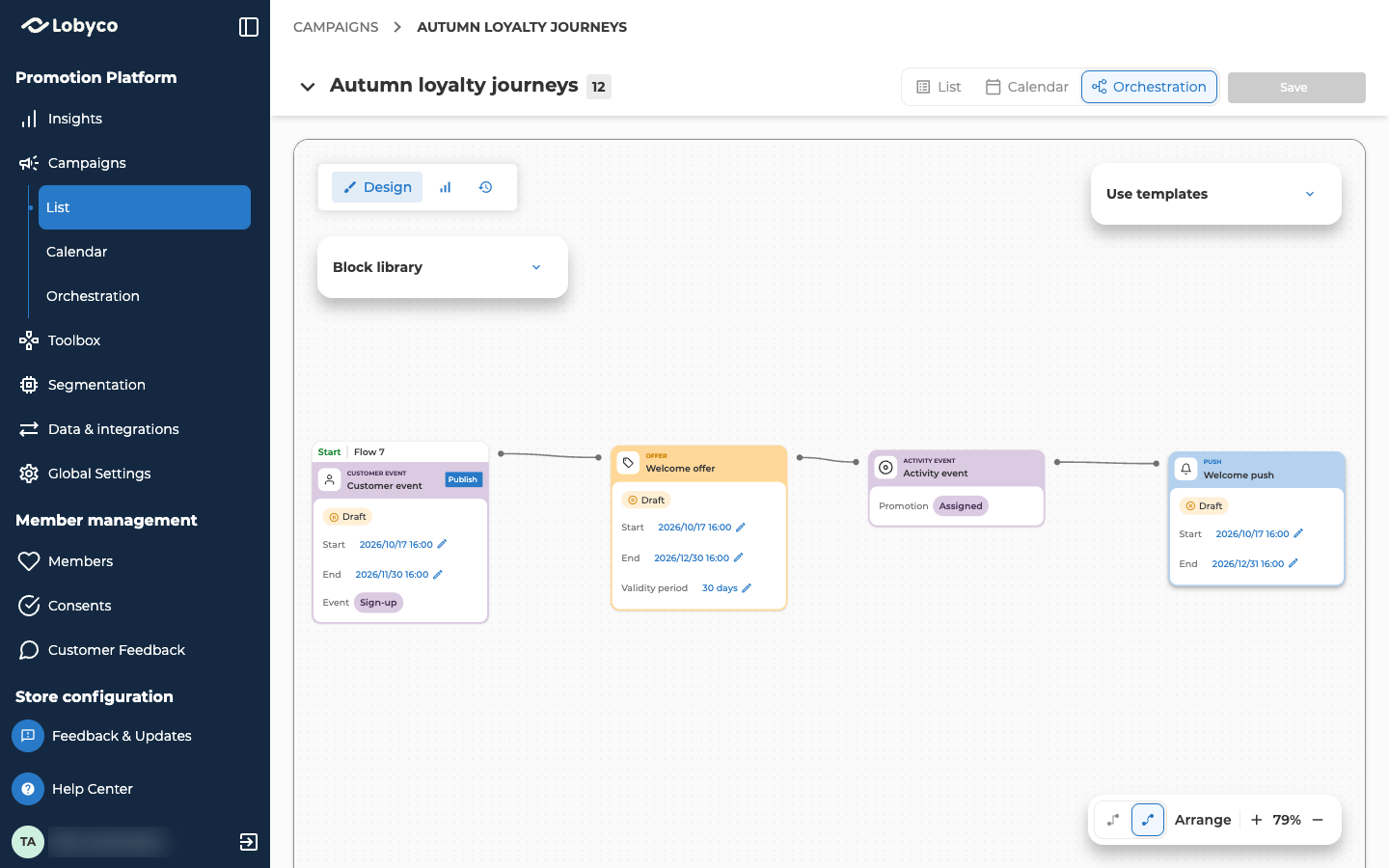
Save and publish the flow
Select Save at the top right of the canvas. Then select Publish on the Customer event, the block with the Start tab, and confirm. That takes it out of Draft, so sign-ups start the flow from its start date.Check the result
Once customers have signed up, check these two things.- Switch the canvas to Live stats. It shows the flow with a count on each block, refreshed every minute. The counts grow as new customers go through the flow.
- Find a new customer in Members and open their Coupons tab. The welcome coupon is there, with its Valid from and Valid to dates.
Variation: send the push a few days later
To remind new customers about their coupon instead of telling them straight away, put a Delay between the Activity event and the Push. In the Delay, set it to wait for 3 day(s), then continue at a time of day, such as 10:00. Each customer’s wait starts when they reach the Delay, so everyone gets the push three days after they joined, at 10:00. The Block reference describes every Delay setting.Variation: tell your own system
To pass each new customer on to another system, such as your CRM, a second flow can start from a Customer event and end in an Outbound API block. Set it up together with whoever runs that system. Outbound API connection tells them how the block calls their system.Related
- Orchestration canvas explains what can start a flow, and how to publish it.
- Offer types explains Gift and the other reward types.
- Give customers a birthday voucher builds the same offer-and-push flow from a daily segment, with a voucher.
- Block reference describes the Customer event, Activity event, Delay and Outbound API blocks in full.