

Pick who gets it
Open the communication in its campaign and find its Segmentation panel. Email has a Segmentation tab instead. The choices depend on the communication.
With Audience, you can pick one or more audiences.
A push or email sent this way goes out once. A push goes at its Delivery date and an email at its Start date. A banner, feed or prompt is shown from its start date to its end date. Lifecycle explains what happens at each step.
Some older pushes, feeds and prompts show a customer file in their Segmentation panel. You can’t change it, and you can’t add a file to a new one.
Trigger it from the canvas
Connect a communication’s block after another block on the orchestration canvas. The flow then decides who gets it. Each time the flow reaches the block, the customers it carries get the push, email, banner, feed or prompt.
Email can’t follow a trigger block directly. What can connect to what has the full rules for every block.
You can only connect or disconnect a communication’s block while the communication is a draft. See Connect the blocks.
What changes in the form
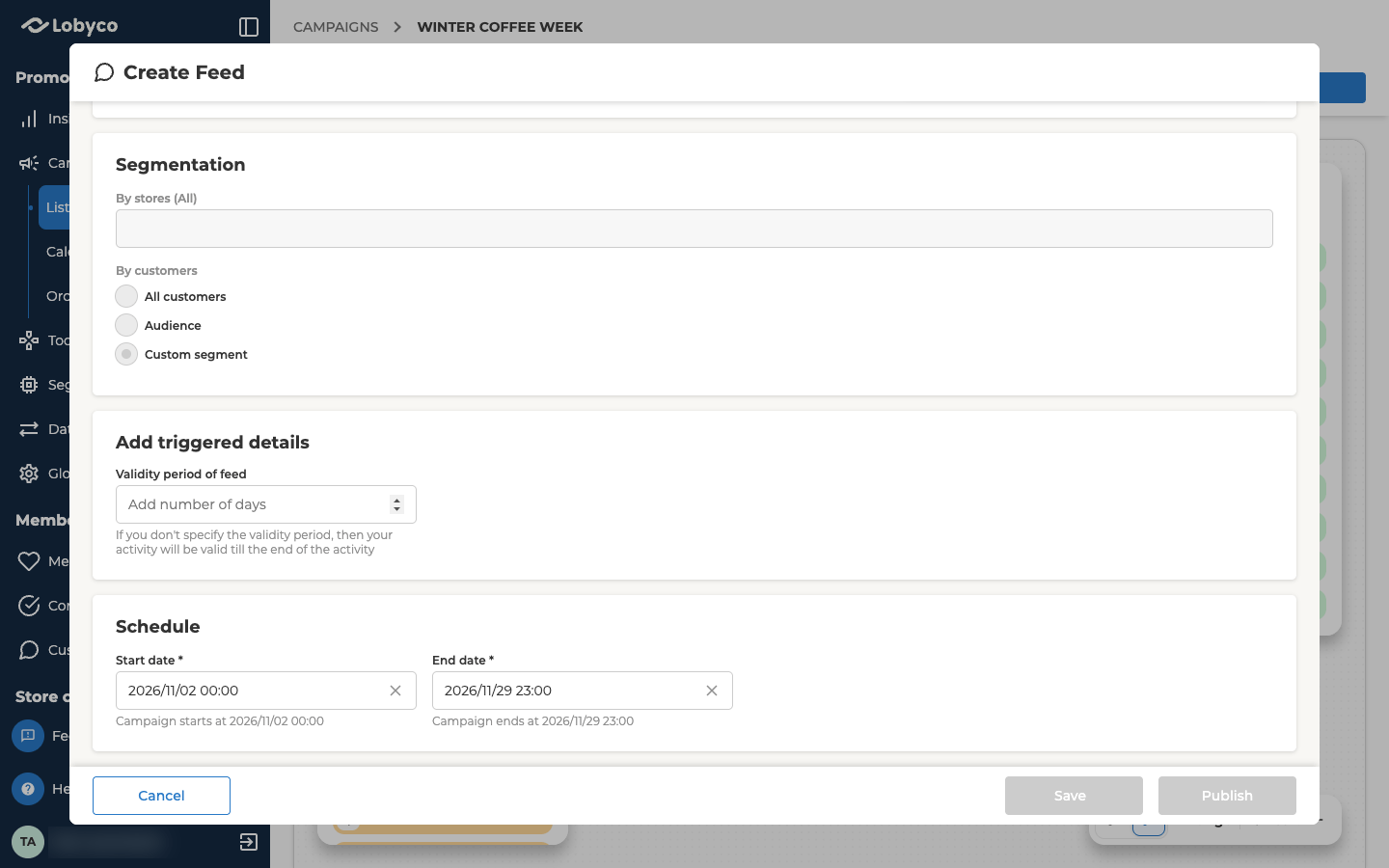
Once the block is connected, its Segmentation switches to a fixed choice. You can’t change it while the block stays connected.
A push keeps Custom even after you disconnect its block, so you can’t change it back. To send it to a group instead, use Duplicate as draft. The copy starts with All customers.
A banner, feed or prompt also gets an Add triggered details panel. Its one field is Validity period of banner, Validity period of feed or Validity period of prompt. It sets how many days each customer sees it, counted from when the flow reached them. If you leave it empty, customers see it until the end date. It can’t be longer than the time between the start and end dates.
When a triggered communication acts
A triggered communication only acts while it’s published and between its start and end dates. If the flow reaches it while it’s a draft, still scheduled or already expired, the run skips it. Those customers don’t get it, and nothing sends it to them later.Personalise a triggered communication
A triggered push, email, feed or prompt can use details the flow passes on, such as a customer’s name. Each communication’s page shows where to add them. A banner is an image, so it has nothing to personalise. What you can use depends on what comes before the communication.- After a segment, add an Enrich block to attach customer attributes.
- After a trigger, you can only use the details the event carries. Enrich can’t follow a trigger.
Older Dynamic Feed blocks
A canvas built earlier can have a Dynamic Feed block. It works differently from Feed. Each time the flow runs, it creates a new feed for the customers in that run. Its Publish on execute switch decides whether the new feed is published or saved as a draft. You can’t add a Dynamic Feed from the Block library any more. To send a personalised feed today, connect a Feed block as described above.Related
- Lifecycle — what each communication does as it moves from draft to expired, and what you can still change.
- Orchestration canvas — building a flow and connecting a communication’s block to it.
- Block reference — every block you can connect before a communication, and what each one passes on.
- Segments and Audiences — building the audiences you pick in a communication’s Segmentation.