

The purchase lifecycle
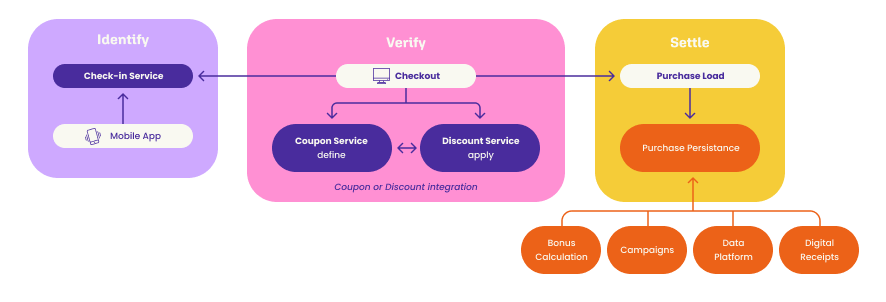
- Setting up a payment location — register each POS or self-checkout once, so it can check customers in and take payments.
- Registering at POS — identify the customer, either by the POS scanning the app or by the customer scanning a sticker.
- Direct coupon service integration or Discount integration — apply the customer’s coupons and offers to the basket. Nothing is stored or charged yet.
- Payments — take the payment through the Payment Coordinator.
- Coupon redemption at POS — confirm which coupons the sale used, so they cannot be used again.
- Transaction data — send the finished sale to the Purchase API. This is the call that records it.
Set up and check in
Both are prerequisites for payments. Check-in is also what gives the POS the customer id the discount calls need.Setting up a payment location
Register each POS or self-checkout once, with its QR code and store.
Registering at POS
Identify the customer in either direction: the POS scans the app, or the customer scans a sticker.
Discounts and coupons
Pick one of two ways to apply discounts. With the Coupon API the POS reads the customer’s coupons and decides what to apply. With the Discount API the POS sends the basket and Lobyco decides. Both end with the same redemption step.Direct coupon service integration
The POS holds the offer definitions and decides which coupons to apply.
Discount integration
The POS sends the basket and Lobyco returns the calculated discounts.
Coupon redemption at POS
Confirm which coupons were used, release unused reservations, refund on returns.
Pay and record
Payments
Create, confirm and capture a payment through the Payment Coordinator.
Transaction data
Send the finished sale to the Purchase API. This is what records it.