

Before you start
- The customer is checked in, so the POS has their
memberId. Coupons belong to a customer, and an anonymous sale gets none. See Registering at POS. - Server-to-server authentication must be working. See API authentication.
- The POS can match a coupon to the offer behind it. If it cannot, ask for the offer data in the first call below.
The flow
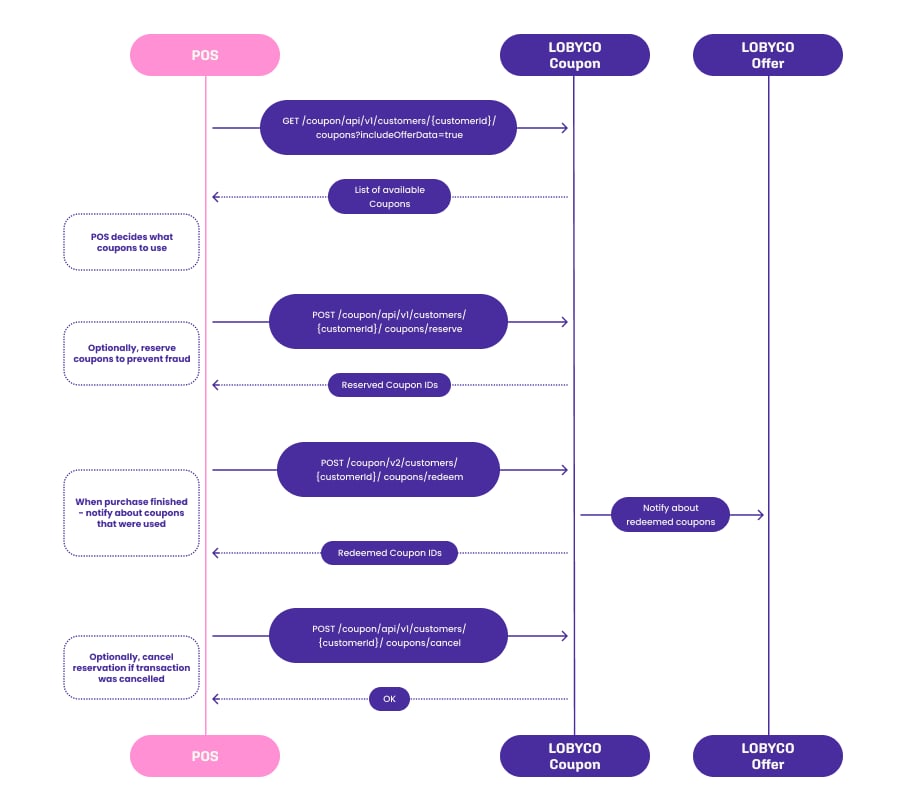
1
Get the customer’s coupons
GET /v2/customers/{customerId}/couponsCall this at check-in, at subtotal, or both. Pass thestoreId to get only the coupons valid in this store. Set includeOfferData=true when the POS does not hold the discount definitions. Each coupon then comes with its discount and receipt text. Otherwise set it to false, for a smaller response.The response is the list of coupons the customer can use now. A coupon that another system has reserved is still listed, with reservedBy and reservedUntil filled in. Skip those.2
Decide which coupons to apply
The POS applies the coupons to the basket in the order of their stacking priority. See Stacking of coupons. Lobyco recommends against asking the customer to choose coupons at the till. It lengthens the checkout and adds a selection flow to the POS for no gain.3
[Optional] Reserve the coupons
POST /api/v1/customers/{customerId}/coupons/reserveReserve the coupons you are about to apply, so the same coupon cannot be used at another POS or online while this sale completes. Send three things:couponIds, the coupons you are about to apply.reservedBy, a value that identifies this POS.reservedUntil, when the reservation ends. Lobyco recommends 1 to 5 minutes. That is long enough to finish the sale and short enough that an abandoned basket does not block the customer elsewhere.
4
Redeem the coupons
POST /v2/customers/{customerId}/coupons/redeemWhen the sale completes, tell Lobyco which coupons it used and the discount each one granted. Send thereceiptId as the Idempotency-Key header, so a retry does not redeem twice and so the coupons can be refunded later. The redemption rules, the offline path and refunds are on Coupon redemption at POS.Failure and edge cases
The sale is complete when the redeem call returns200 OK with the redeemed coupon ids. Lobyco then marks the coupons as used.
- The sale is cancelled after a reservation. Release the coupons with the cancel-reservation call, described on Coupon redemption at POS. Otherwise they stay blocked until
reservedUntil. - Lobyco is unreachable. Coupon retrieval has no offline mode. Complete the sale without loyalty discounts rather than hold the queue. Redemption does have an offline path, through the recorded purchase.
- The customer returns the goods. Refund the coupons with the same idempotency key you redeemed them with. See Returns and refunds.
API reference
Endpoint documentation: Coupons (POS).Related
- Discount integration — the alternative, where Lobyco calculates the discounts from the basket.
- Coupon redemption at POS — redeeming, releasing and refunding coupons, shared by both approaches.
- Transaction data — the call that records the sale. Redeeming coupons does not.