

Before you start
- The checkout is registered as a payment location. See Setting up a payment location.
- The customer is checked in at it, so the POS has their
memberId. See Registering at POS. - Server-to-server authentication must be working. See API authentication.
The flow
With confirmation, the customer approves the payment in the app before the POS captures it. This is the flow for card, wallet and subscription payments, and for bonus when you want the customer to confirm. Without confirmation, a payment taken entirely from the customer’s bonus balance is created and captured in two calls.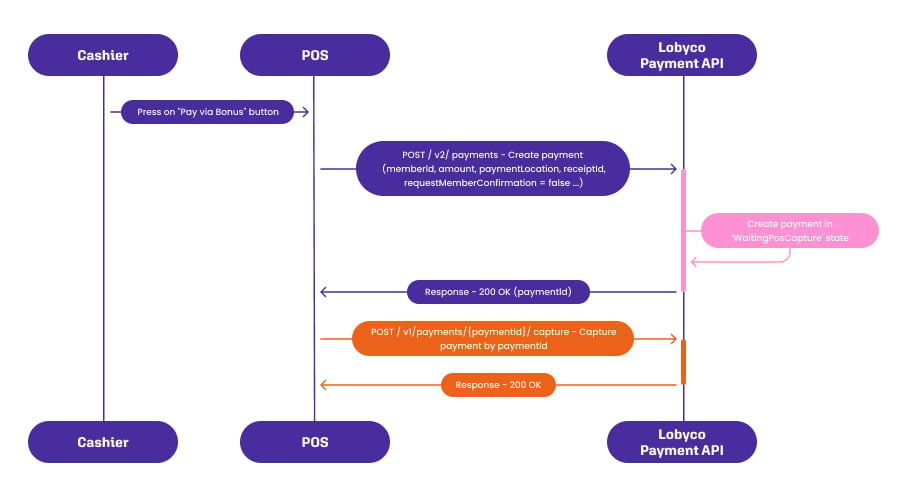
1
Create the payment
POST /v2/paymentsThe request carries:type, set toPOS.paymentLocation, the checkout.receiptId, the sale.memberId, from check-in.amount, what the customer pays.operationId, unique per attempt. Reuse it only when retrying the same attempt, so a retry cannot create a second payment.requestMemberConfirmation,trueorfalse, explained below.
paymentId.Set requestMemberConfirmation: true to let the customer choose the payment method and confirm in the app. The payment starts in the WaitingMemberConfirmation state. Set it to false only for a payment taken entirely from the customer’s bonus balance. Lobyco then confirms it without the customer, and the payment starts in WaitingPosCapture. The customer must confirm a card or wallet payment.2
Wait for the customer to confirm
GET /v2/payments/{paymentId}Poll the payment every few seconds while itsstate is WaitingMemberConfirmation. The customer sees the amount in the app, picks a method and confirms. The state then changes to WaitingPosCapture. Give the customer a fixed time to confirm, and cancel the payment when it runs out, so the till is not left waiting.3
Capture the payment
POST /v2/payments/{paymentId}/captureCapture once the state isWaitingPosCapture. Send the amount and an operationId. A partial capture is allowed, and Lobyco cancels the remainder. The state becomes Captured, and the money moves.4
[Optional] Cancel the payment
POST /v1/payments/{paymentId}/cancelCancel a payment that has not been captured, because the customer did not confirm in time or the sale was abandoned. The state becomesCanceled.5
[Optional] Refund the payment
POST /v1/payments/{paymentId}/refundRefund a payment that has been captured, for example on a return. A refund is a separate transaction that references the original. It reportsWaitingRefund while in progress and Refunded when done.Payment states
Payment methods and providers
For a POS payment the customer picks the method in the app when confirming. The methods are bonus, a saved or new card, a loyalty subscription, Apple Pay and Google Pay. Which of them a customer sees depends on what is enabled for your programme. Card handling sits behind the Payment Card Provider, Lobyco’s generic card service. The acquirer can change without a change to your integration. Worldline, Rapyd and Moneris are supported today, and Lobyco can add providers. It covers saving a card against the customer’s account for reuse, and paying without storing the card. It also handles Apple Pay and Google Pay, loyalty subscription top-ups, and a web interface for managing saved cards where one is needed. The same service takes e-commerce and scan-and-pay payments. Those usetype: Ecommerce or type: ScanAndPay with a storeId instead of a paymentLocation, and otherwise follow the same states.
Failure and edge cases
A finished payment is one in theCaptured state. Admin users see every payment in the Lobyco Admin Portal, and can capture, cancel or refund one by hand when the POS could not.
- A call times out. Retry it with the same
operationId. Lobyco recognises the retry and does not create or capture twice. - The customer never confirms. Cancel the payment when your timeout runs out, so the app stops showing it, then take the payment another way.
- Cancel and refund are not interchangeable. Cancel works only before capture, refund only after it. The call for the wrong state fails.
- A captured payment does not record the sale. Send the finished sale to the Purchase API as well, as described in Transaction data.
API reference
Endpoint documentation: Payment Coordinator.Related
- Registering at POS — the check-in that supplies the
memberIdand the amount the customer can pay from their account. - Transaction data — the call that records the sale. Capturing a payment does not.