

Before you start
- The customer is checked in, so the POS has their
memberId. Lobyco applies no discounts to an anonymous purchase. See Registering at POS. - Server-to-server authentication must be working. See API authentication.
- To test, create at least one offer in the Lobyco Admin Portal and activate it for your test customer. Give it a redemption limit of 999, so the same offer keeps working through repeated test purchases.
The flow
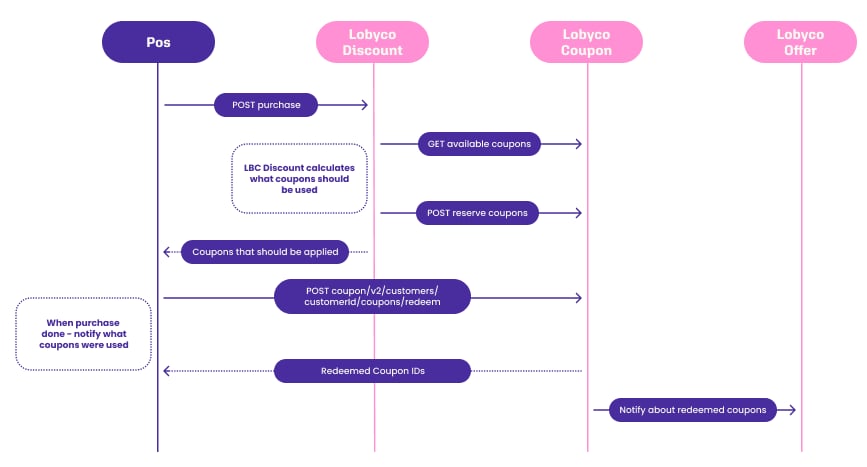
1
Send the basket
POST /v1/discounted-purchasesSend the basket in the same shape as a purchase:receiptId, the sale’s id. The coupon reservation and the redemption later refer to it.storeId, the store.memberId, the checked-in customer.products, with their prices.discounts, any the POS has already applied.
receiptId. It stops the same coupons being used at another POS while this sale completes. Pass skipReservation=true to price a basket without reserving, for example one the customer has not committed to yet.2
Apply the response
The response repeats the request with the discounts applied:totalAmountis reduced by the total discount.- Each product’s
priceis reduced by the discounts applied to that product. discountslists every applied discount: itsname, itstotalDiscountAmount, thecouponIdsthat granted it, andappliedProducts, the sequence numbers of the products it applied to. For a basket-level discount,appliedProductsis empty.
couponIds for the next step.3
Redeem the coupons
POST /v2/customers/{customerId}/coupons/redeemWhen the sale completes, redeem the coupons from the response, with thereceiptId as the Idempotency-Key header. If the POS cannot reach Lobyco at that moment, include the same coupon ids on the purchase you record instead. Both paths are on Coupon redemption at POS.The basket endpoint
POST /v1/discounted-baskets Integrations built before the purchase endpoint send a basket instead, and read a differently shaped response. New integrations use the purchase endpoint above.- The response repeats the basket
idand thetotalbefore discounts, and addsfinalTotal, the total after every discount at line and basket level. - Each line item repeats the product and adds
finalTotalSalePrice, the line total after discounts. Beside it sit thediscountsapplied to that line and thecouponsused for them. - Basket-level
discountsandcouponssit beside the line items, in the same shape.
Stacking of coupons
When more than one offer applies to a basket, Lobyco applies them in priority order. Marketers set the priority on each offer in the Lobyco Admin Portal, from 1 to 10, where 1 is the highest. The order holds across kinds: a product-level offer and a basket-level offer are ordered by priority, not by kind. Between offers of equal priority, the coupon that expires sooner goes first. The marketer’s side of this is on Stacking and limits.Compatibility and feature flags
Lobyco keeps the Discount API response contract backward compatible. Existing fields keep their meaning, and Lobyco does not start returning data that changes how an existing integration should read the result. New fields can appear, and they arenull until you opt in to whatever populates them.
A new feature that changes the calculation or the response ships behind a feature flag. The flag is off by default, so an existing integration is unaffected until you ask Lobyco to enable it. Some flags can be overridden per request through a query parameter on the call, such as preserveExternalDiscounts. That lets you test the new behaviour against one test customer before enabling it for everyone.
Failure and edge cases
A successful call is a200 OK with the priced basket. The sale is complete when the redeem call for its coupons returns 200 OK.
- The purchase is anonymous. Lobyco returns the basket unchanged, with no discounts. Do not call the endpoint for sales without a
memberId. - Lobyco is unreachable. The Discount API has no offline mode. If the call does not answer within the time your checkout allows, complete the sale without loyalty discounts.
- The sale is cancelled after the call. The coupons Lobyco reserved free themselves after 1 minute. To release them sooner, cancel the reservation with
reservedByset to thereceiptId, as described on Coupon redemption at POS. - The customer returns the goods. Refund the coupons with the same idempotency key you redeemed them with. See Returns and refunds.
API reference
Endpoint documentation: Discounts and Coupons (POS).Related
- Direct coupon service integration — the alternative, where the POS decides which coupons to apply.
- Coupon redemption at POS — redeeming, releasing and refunding coupons, shared by both approaches.
- Transaction data — the call that records the sale, and the validation rules the basket must already meet.