

What you’ll build
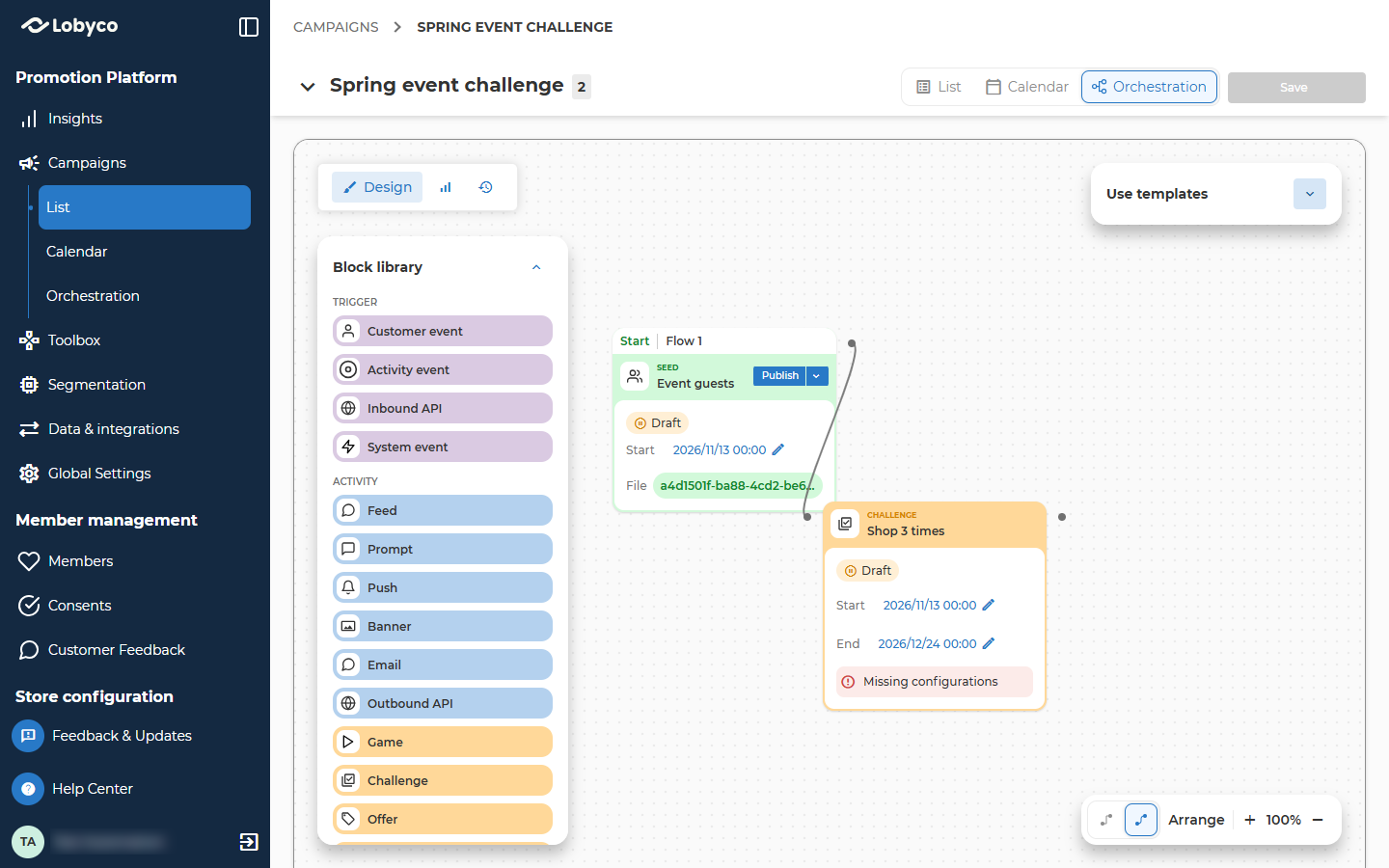
The Seed block starts the flow and reads the list. The Challenge block gives each customer on it a card. A challenge that is connected to a block this way is called a triggered challenge, because the block before it decides who gets it. Nexus has no screen for uploading a list straight into a challenge. The list always goes in through a block on the canvas.Prepare the list
Save the list as a CSV file. Use your own customer list shows how the file has to be set out, and how to save it from Excel.
The Challenge block gives a card to every ID in the list. It doesn’t check that the ID belongs to a customer. A card for an ID that matches nobody does no harm, but it counts as a card given. The Seed block’s line under the file, such as 950 of 1000 records matched, shows how many IDs matched, so check it before you run the flow.
Check the list before you run the flow. A value longer than 36 characters, such as a pasted sentence, stops the whole import, and nobody gets a card.
A saved audience can’t go in as it is. The Seed block takes a file or an earlier campaign’s result, and it has no way to pick an audience. If the customers are in an audience, use the file you made it from. To give the challenge to customers a segment finds, see Variations.
Add a Seed block
- Go to Campaigns, open the campaign and select Orchestration. To start a new campaign, see Create a campaign.
- From Segment in the Block library, drag Seed onto the canvas.
- Double-click it. Create Seed opens on Add Seed details.
- Enter a Seed name, such as Spring event guests, and a Description.
- Under Schedule type, choose One-time. A Recurring schedule gives the whole list another card on every run. You don’t publish the flow to run it, because Run the flow starts it by hand.
Upload the list
- Open Configure seed. Under File upload, choose File.
- Drop the file on the box, or select it.
- Check the line under the file, such as 950 of 1000 records matched. It says how many of the IDs matched a customer.
- Select Save.
Set up the challenge
A challenge has to be published and active when the flow runs. If it’s a draft, its Start date is still ahead or it has ended, it gets skipped and nobody receives a card.- On the same canvas, add the challenge as Create a challenge explains.
- Connect the Seed to the challenge’s block before you publish the challenge. Once it’s published, Nexus asks you to bring it back to draft first.
- Fill in the challenge’s form and publish it. Set the dates so the challenge is already running when you run the flow.
The Segmentation tab is locked for a triggered challenge, because the list decides who gets it.
When a list gives out the cards, Lobyco skips some of the checks it makes when one customer gets a card.
- Time between challenges issued doesn’t apply. Every customer on the list gets a card, even one who got a card of this challenge recently.
- The one-time or renewable setting doesn’t stop a card. A customer who has already completed the challenge as many times as One-time or Auto-renewable allows still gets one.
- Lobyco doesn’t check that each ID belongs to a customer. Prepare the list explains what happens to an ID that matches nobody.
Test the flow with a count
- Open the chevron beside Publish on the Seed and choose Count. Nothing is given out.
- The canvas switches to History, with the run selected. Wait for it to show Done.
- Select the Seed block to see its Count.
Run the flow
- Go to Campaigns, open the campaign and find the challenge in its list of activities. Check that its Status reads Active.
- Open the chevron beside Publish on the Seed and choose Execute.
- Confirm. The canvas switches to History, with the run selected.
Check the result
- In History, wait for the run to show Done.
- Select the Challenge block. Look at its status, and at the number on the block, which reads total allocations. It’s the number of cards given out.
- Compare it with the Seed block’s Count. When every card was given out, the two numbers are the same.
The Seed count is the number of different IDs in the file. An ID that’s in the file twice, and an empty row, don’t count twice. So total allocations can be lower than the number of rows in your file.
To look at one customer, ask them to open the app. A card shows in the app’s list, unless Hide Challenge from App List is on, and it starts collecting progress at once only when Pre-activated is on. To see why a purchase isn’t counting, read Why isn’t a customer’s challenge progressing?. Nexus doesn’t show which customers hold a card.
What a second run does
A customer can only have one running card of a challenge at a time. A second run still gives every customer on the list a second card. What the second card does depends on the first one.
A waiting card takes over once the first card is completed or expires.
- Pre-activated on. The card becomes active the next time the customer opens the app, or with their next purchase that earns progress. That purchase counts toward it.
- Pre-activated off. The customer activates the card in the app. Purchases made before they do don’t count.
Fix a flow that left customers out
- Find out which of the causes in Troubleshooting fits what the Challenge block showed.
- Fix it.
- After Skipped or Failed, nobody got a card, so run the flow again once the cause is fixed. In any other case, don’t run it again yet. Nexus can’t show which customers got a card, and sending the list again gives a second card to every customer who already has one. Ask Lobyco support to check who got a card before you send the list again.
Variations
Troubleshooting
Why did the Challenge block say Skipped?
Why did the Challenge block say Skipped?
The run skips the Challenge block when the challenge isn’t active, which means it’s a draft, its Start date is still ahead or it has ended, or when no block is connected to it. A Count or Simulate run always skips it. Go to Campaigns, open the campaign, and find the challenge in its list of activities. Its Status has to read Active. Then run the flow again with Execute.
Why did the Challenge block fail?
Why did the Challenge block fail?
Open View more on the run and read the message under the failed step. Nothing in your file causes this, so send the campaign’s name, the run’s date and time, the challenge’s name and the message to Lobyco support. Nobody got a card, so you can run the flow again once Lobyco support has fixed the cause.
Why is there no number on the Challenge block?
Why is there no number on the Challenge block?
The block shows Done as soon as Lobyco has received the list, and the number appears when all the cards are given out. A long list takes a while. If something stops it, for example a value in the file longer than 36 characters, the canvas doesn’t say so. Wait, then reopen the run, or select Live stats on the mode switcher at the top left of the canvas. If the number still hasn’t appeared, don’t run the flow again, because sending the list again gives a second card to every customer who already has one. Send the campaign’s name, the run’s date and time, and the challenge’s name to Lobyco support.
Why are there fewer allocations than customers on my list?
Why are there fewer allocations than customers on my list?
An ID that’s in the file twice gets one card, and an empty row gets none. total allocations counts the cards given out, not the rows in the file.
Why did a customer get the card twice?
Why did a customer get the card twice?
The flow ran twice. Each Execute, and each scheduled run, gives every customer on the list a second card, which waits until the customer’s first card is completed or expires. What a second run does explains how. To avoid it, set Schedule type to One-time on the Seed’s Add Seed details tab. Don’t run the flow again to fix a gap. Ask Lobyco support to check who got a card first.
Why can't I connect the Challenge block to my Seed?
Why can't I connect the Challenge block to my Seed?
If the challenge is published, Nexus won’t change its links. Unpublish the challenge, connect the block, and publish it again. A Split can’t connect straight in either, so connect one of its groups. Create a challenge explains the rules.
Why isn't a customer's second card collecting progress?
Why isn't a customer's second card collecting progress?
The customer’s first card is still running, so the second card waits. Purchases count toward the first card until it’s completed or expires. What a second run does explains when the second card takes over.
Related
- Use your own customer list — how to prepare and upload the file the Seed reads.
- Create a challenge — every field of the challenge form, and how a block connects to it.
- Schedule and run a campaign — the run options, and how to read History.
- Why isn’t a customer’s challenge progressing? — what to check once a customer has the card.
- Block reference — the Seed block and what it passes on.