

/v1/members/{memberId}.
What Lobyco holds about a customer
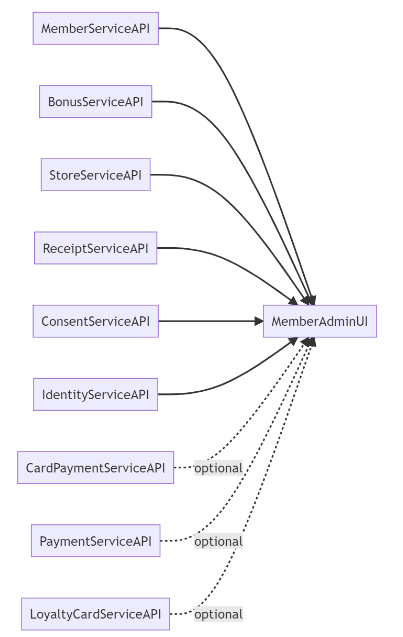
Which of these Lobyco keeps depends on the services you run.
All of it is available to the mobile app, to admin users in Nexus, and to the third-party services you expose it to.
Customers
Your backend loads customers with POST /v1/members/import. It is an upsert: a record whosememberId exists is updated, any other is created. Each record carries:
memberId, your identifier for the customer, stable over time. It is the matching key.isActiveandcreatedAt.- The profile: the names,
email,phone,birthdate,genderId,nationalityand theaddress. selectedStoreId, the customer’s preferred store.loyaltyProgram, the programme or tier, such asSilverorGold.metadataandcustomProperties, your own attributes.
Id, Email, Phone, PersonalId, SelectedStoreId or LoyaltyCardId. PATCH /v1/members/{memberId} changes single fields.
Cooperatives
A customer can belong to local cooperatives, which grant type-specific bonuses. Admin users see them in Nexus but cannot change them there. They are set through the API.Changes history
Every change to a customer is recorded with a timestamp and the initials of who made it. That covers creation, edits by the customer or an admin user, activation and deactivation, and a change of preferred store. Admin users see the list on the customer’s overview in Nexus. They can attach a note to a change, or a note about the customer, typically after a support call.Deactivating and deleting a customer
PUT /v1/members/{memberId}/deactivate suspends the customer. It takes areason, a timestamp and who made the change in changedBy. A customer who is signed out can no longer sign in. One who is signed in sees a notice and is signed out when they dismiss it. Their loyalty cards are deactivated with them, and the reason goes into the changes history. PUT /v1/members/{memberId}/activate reverses it.
DELETE /v1/members/{memberId} removes the customer and anonymises their data. It takes a reason and a deletionMode:
Immediate, the default: the customer is deleted now.Notification: nothing is deleted. Lobyco emails your administrator, who processes the request by hand.
Loyalty cards
A customer holds one or more cards and checks in at the POS with an active one. That is what earns benefits and makes coupons redeemable; see Registering at POS.
POST /v1/loyalty-cards creates a card for a
memberId. Give it a cardId, or leave it out and Lobyco assigns the next barcode from a queue you have loaded. Send an operationId on every call. It is the idempotency key, so a retry does not create a second card. Set the replaceActive query parameter to deactivate the customer’s other active cards at the same time.
Two limits apply, and both are configured for your environment:
- The number of active cards per customer. A call that would exceed it is rejected, and so is an import row.
- The barcode ranges and prefixes a
cardIdmust fall within.
state. PUT /v1/loyalty-cards/{cardId} activates or deactivates one card. POST /v1/loyalty-cards/{memberId}/deactivate deactivates all of a customer’s active cards. Admin users add, activate and deactivate cards in Nexus, where a customer’s physical and virtual cards are listed together.
Decoding barcodes
Lobyco turns a raw scanned barcode into structured data with templates. A template describes how one kind of barcode is built. It has a name and a type, such as an article or a voucher, and a minimum and maximum length. It says which code identifiers appear and where they sit, how the data tokens are extracted, and how the result is validated. Decoding runs in a fixed order:- Match the barcode to a template. When several match, one is chosen.
- Validate it against that template’s rules.
- Extract the data.
Linked customers
A link joins two customer records: an additional cardholder on the same membership, or two memberships merged into one. POST /v1/linked-members creates one, with aprimaryMemberId, a relatedMemberId and a relationshipType of AdditionalCardHolder or MergedMembership. Both customers must exist and be active. A duplicate link is rejected, and the feature is switched on per environment. Links are bidirectional: GET /v1/linked-members/{memberId} returns them from either side. DELETE /v1/linked-members removes one, and deleting a customer removes their links with them.
Importing in bulk
Customers, loyalty cards and linked customers import the same way. Each is a synchronous bulk upsert that creates and updates in one call, validates every record at once, and answers with a result per record.
Because validation is per record, a batch can partly succeed. Validate before you send, to keep the failure rate down. Use stable identifiers, so a retry matches the same records. Read the response instead of assuming the batch went in, and retry only the records that failed.
API reference
Endpoint documentation: Members.Related
- Consent — what a customer has agreed to, and how acceptance is recorded.
- Import audiences from your system — lists of customers that activities and channels target.
- Registering at POS — how a loyalty card identifies the customer at the checkout.
- Payments — card payments made in the app.
- Transaction data — the purchases and receipts that hang off the customer.