> ## Documentation Index
> Fetch the complete documentation index at: https://help.lobyco.com/llms.txt
> Use this file to discover all available pages before exploring further.
# Transaction Data
> Send the finalized sale to the Purchase API. This is the call that records the transaction.
Transaction data is what a till captures at the moment of sale: when it happened, in which store, what was bought at what price, how it was paid for, and which discounts applied.
It is the input that unlocks:
* Digital receipts
* Real-time bonus (earn)
* Challenges (formerly Stamp Cards)
### The Purchase API is what records the sale
The **Purchase API** (PurchaseLoad) is the record of sale. It stores the transaction and triggers receipts, bonus and challenges. It is **not** the Discount API, which only *calculates* discounts during checkout and stores nothing.
Even if you use the Discount API at the till, you must still send the finalized transaction here. See [POS Integrations](/integration/pos-point-of-sale-integrations) for where this sits in the lifecycle.
## How it works
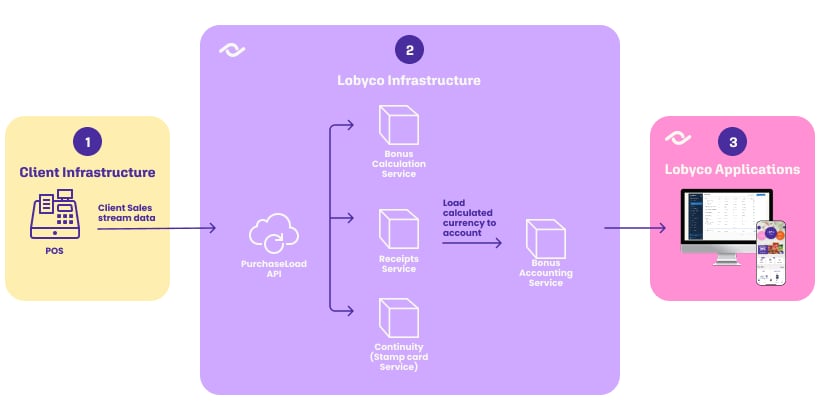
The API is built for fast ingestion, so the till is not left waiting. It validates the payload, stores it, and *asynchronously* publishes a `PurchaseLoadedEvent` to message broker topics that other services subscribe to — bonus calculation, digital receipts and the rest.
Purchases with and without a customer are published to **separate topics**. If you send a `loyaltyCardId` without a `memberId`, the service resolves the customer for you from the Loyalty Card service before publishing.
 ## Integration options
| | Online | Offline |
| ------- | ----------------------------------------------------------------------------- | ------------------------------------------------------------------------ |
| How | Each transaction sent on its own, in near real time, as the till completes it | Transactions batched into files and sent through the Data Import service |
| Latency | Near real time | Batch |
| Suits | Real-time bonus, receipts that appear while the customer is still in the shop | Tills without reliable connectivity, or an existing nightly export |
**Persist before you send.** Write the transaction to local storage first, then transmit. A network blip or a service outage then costs you a retry rather than a lost sale.
## Purchases with and without a customer
The presence of `memberId` in the payload decides how a purchase is treated.
| | Behaviour |
| ---------------------- | --------------------------------------------------------------------------------------------------------------- |
| **`memberId` present** | Linked to the customer. Digital receipts, bonus, coupons and challenge progress all follow. |
| **`memberId` absent** | Treated as an anonymous transaction. Still validated and stored, but none of the customer-facing services fire. |
**Send everything, not just identified sales.** Filtering anonymous purchases out is technically possible but costs you:
* Lobyco sees only revenue from identified customers, so the business context is incomplete
* Analytics degrade — some products, such as Self Checkout fraud detection, rely on whole-basket analysis
* Power BI reports comparing identified and anonymous behaviour become impossible
## Validations
The payload is validated before anything is stored. These are the rules your integration has to satisfy.
### Required fields
| Field | Constraints |
| -------------------------- | ------------------------------------------------ |
| `receiptId` | Max 64 characters |
| `storeId` | Max 128 characters |
| `currencyCode` | Exactly 3 characters (ISO-4217, e.g. DKK, EUR) |
| `totalAmount` | Can be negative when returns exceed purchases |
| `totalTaxAmount` | Total VAT amount included in price |
| `purchaseDateTimeUtc` | Valid UTC, e.g. `2020-04-14T11:00:00Z` |
| `purchaseBusinessDateTime` | Store local timezone, e.g. `2020-04-14T13:00:00` |
| `products` | At least one product |
### Checkout type
The optional `checkoutType` records which channel the sale came through.
| Value | Channel |
| -------------- | ------------------------------------------ |
| `Pos` | Traditional terminal operated by a cashier |
| `SelfCheckout` | Self-service kiosk in store |
| `ScanAndPay` | Mobile scan-and-pay while shopping |
| `Online` | E-commerce |
### Products
Each product requires `id`, `sequenceNumber`, `name`, `categoryId`, `quantity`, `originalPrice` and `price`.
* `price` is the amount **after** product-level discounts; `originalPrice` is before them
* Returned or cancelled products carry a **negative** `price`
* `price` and `originalPrice` must share the same sign
* `categoryId` must not be empty or whitespace
### Payment methods
At least one payment method is required unless `totalAmount` is zero. Each needs `amount` and a `paymentType` of `Card`, `Cash`, `LoyaltyApp` or `Other`.
* Card payments require `cardPan`, the masked card number
* Foreign currency requires both `currencyCode` and `conversionRate` (≥ 0)
* If the currency matches the purchase currency, `conversionRate` must be `1`
* `rounding` is only allowed on `Cash`
### Discounts
Discounts are optional, and each entry needs a `totalDiscountAmount`. There is no `totalDiscount` field on the purchase itself — the `discounts` array holds individual entries.
An entry is **global** when `appliedProducts` is missing, null or empty, and **product-level** when it lists product sequence numbers. The distinction changes how the amounts are validated.
One product can carry **several discounts**: the same `sequenceNumber` may appear in more than one entry, each with its own `name` and `totalDiscountAmount`. The product's `price` must reflect the total after all of them, while `originalPrice` stays untouched — so a product at `10.00` with discounts of `0.50` and `4.83` ends up with a `price` of `4.67`.
Keeping the discounts as separate entries is what lets each one be reported on individually.
A worked payload for this case is in the [Purchases API reference](/api-reference/retail-master-data/purchases).
### Amount calculations
`totalAmount` has to reconcile three ways, and all three must agree.
| From | Formula |
| --------------- | --------------------------------------------------------------------------------------------------- |
| Product prices | sum of `products.price` − sum of **global** `discounts.totalDiscountAmount` + `taxNotIncluded` |
| Original prices | sum of `products.originalPrice` − sum of **all** `discounts.totalDiscountAmount` + `taxNotIncluded` |
| Payments | sum of (`paymentMethods.amount` + `rounding`) × `conversionRate` |
`taxNotIncluded` is `totalTaxAmount` when any product has `taxIncludedInPrice = false`, and 0 otherwise.
The first two agreeing is what proves your discounts correctly bridge original prices and actual prices. A small deviation against the payment sum is tolerated.
### Other rules
* `memberId`, `loyaltyCardId`, `externalDiscountCardId`, `posId` and `phone` must not be empty or whitespace when provided
* Tax `percentage` is a fraction between 0 and 1 — `0.25` for 25%
* Quantity `value` must not be 0
* Shipping `totalAmount` must be greater than 0
* DisposalItem `unitPrice` must be greater than 0
## API reference
Endpoint documentation: [Purchases](/api-reference/retail-master-data/purchases).
## Integration options
| | Online | Offline |
| ------- | ----------------------------------------------------------------------------- | ------------------------------------------------------------------------ |
| How | Each transaction sent on its own, in near real time, as the till completes it | Transactions batched into files and sent through the Data Import service |
| Latency | Near real time | Batch |
| Suits | Real-time bonus, receipts that appear while the customer is still in the shop | Tills without reliable connectivity, or an existing nightly export |
**Persist before you send.** Write the transaction to local storage first, then transmit. A network blip or a service outage then costs you a retry rather than a lost sale.
## Purchases with and without a customer
The presence of `memberId` in the payload decides how a purchase is treated.
| | Behaviour |
| ---------------------- | --------------------------------------------------------------------------------------------------------------- |
| **`memberId` present** | Linked to the customer. Digital receipts, bonus, coupons and challenge progress all follow. |
| **`memberId` absent** | Treated as an anonymous transaction. Still validated and stored, but none of the customer-facing services fire. |
**Send everything, not just identified sales.** Filtering anonymous purchases out is technically possible but costs you:
* Lobyco sees only revenue from identified customers, so the business context is incomplete
* Analytics degrade — some products, such as Self Checkout fraud detection, rely on whole-basket analysis
* Power BI reports comparing identified and anonymous behaviour become impossible
## Validations
The payload is validated before anything is stored. These are the rules your integration has to satisfy.
### Required fields
| Field | Constraints |
| -------------------------- | ------------------------------------------------ |
| `receiptId` | Max 64 characters |
| `storeId` | Max 128 characters |
| `currencyCode` | Exactly 3 characters (ISO-4217, e.g. DKK, EUR) |
| `totalAmount` | Can be negative when returns exceed purchases |
| `totalTaxAmount` | Total VAT amount included in price |
| `purchaseDateTimeUtc` | Valid UTC, e.g. `2020-04-14T11:00:00Z` |
| `purchaseBusinessDateTime` | Store local timezone, e.g. `2020-04-14T13:00:00` |
| `products` | At least one product |
### Checkout type
The optional `checkoutType` records which channel the sale came through.
| Value | Channel |
| -------------- | ------------------------------------------ |
| `Pos` | Traditional terminal operated by a cashier |
| `SelfCheckout` | Self-service kiosk in store |
| `ScanAndPay` | Mobile scan-and-pay while shopping |
| `Online` | E-commerce |
### Products
Each product requires `id`, `sequenceNumber`, `name`, `categoryId`, `quantity`, `originalPrice` and `price`.
* `price` is the amount **after** product-level discounts; `originalPrice` is before them
* Returned or cancelled products carry a **negative** `price`
* `price` and `originalPrice` must share the same sign
* `categoryId` must not be empty or whitespace
### Payment methods
At least one payment method is required unless `totalAmount` is zero. Each needs `amount` and a `paymentType` of `Card`, `Cash`, `LoyaltyApp` or `Other`.
* Card payments require `cardPan`, the masked card number
* Foreign currency requires both `currencyCode` and `conversionRate` (≥ 0)
* If the currency matches the purchase currency, `conversionRate` must be `1`
* `rounding` is only allowed on `Cash`
### Discounts
Discounts are optional, and each entry needs a `totalDiscountAmount`. There is no `totalDiscount` field on the purchase itself — the `discounts` array holds individual entries.
An entry is **global** when `appliedProducts` is missing, null or empty, and **product-level** when it lists product sequence numbers. The distinction changes how the amounts are validated.
One product can carry **several discounts**: the same `sequenceNumber` may appear in more than one entry, each with its own `name` and `totalDiscountAmount`. The product's `price` must reflect the total after all of them, while `originalPrice` stays untouched — so a product at `10.00` with discounts of `0.50` and `4.83` ends up with a `price` of `4.67`.
Keeping the discounts as separate entries is what lets each one be reported on individually.
A worked payload for this case is in the [Purchases API reference](/api-reference/retail-master-data/purchases).
### Amount calculations
`totalAmount` has to reconcile three ways, and all three must agree.
| From | Formula |
| --------------- | --------------------------------------------------------------------------------------------------- |
| Product prices | sum of `products.price` − sum of **global** `discounts.totalDiscountAmount` + `taxNotIncluded` |
| Original prices | sum of `products.originalPrice` − sum of **all** `discounts.totalDiscountAmount` + `taxNotIncluded` |
| Payments | sum of (`paymentMethods.amount` + `rounding`) × `conversionRate` |
`taxNotIncluded` is `totalTaxAmount` when any product has `taxIncludedInPrice = false`, and 0 otherwise.
The first two agreeing is what proves your discounts correctly bridge original prices and actual prices. A small deviation against the payment sum is tolerated.
### Other rules
* `memberId`, `loyaltyCardId`, `externalDiscountCardId`, `posId` and `phone` must not be empty or whitespace when provided
* Tax `percentage` is a fraction between 0 and 1 — `0.25` for 25%
* Quantity `value` must not be 0
* Shipping `totalAmount` must be greater than 0
* DisposalItem `unitPrice` must be greater than 0
## API reference
Endpoint documentation: [Purchases](/api-reference/retail-master-data/purchases).