> ## Documentation Index
> Fetch the complete documentation index at: https://help.lobyco.com/llms.txt
> Use this file to discover all available pages before exploring further.
# Payments
> Capture funds through the Payment Coordinator: bonus, card, Apple and Google Pay.
The **Payment Coordinator** is Lobyco's single entry point for taking money. It orchestrates across payment methods and providers, and it handles the POS check-in that identifies the customer in the first place.
**Do these first.** Payments assume a payment location exists and the customer has checked in:
1. [Setting up a payment location](/integration/pos-point-of-sale-integrations/setting-up-a-payment-location)
2. [Registering at POS](/integration/pos-point-of-sale-integrations/registering-at-pos)
## What it covers
| | |
| -------------- | --------------------------------------------------------------------------- |
| **Methods** | Bonus (loyalty currency), card, loyalty subscription, Apple Pay, Google Pay |
| **Operations** | Initialize, authorize, capture, cancel, refund |
| **Callers** | Mobile app, web checkout, POS, Admin Tool, third-party apps |
Transactions are visible in the Lobyco Admin Tool, where capture, refund and cancel can also be performed by hand.
## Checking a customer in
A customer must check in before they can see personalised content — bonus balance, personal offers, digital receipts — or pay with anything held in their account. The Payment Coordinator supports check-in and reverse check-in using any of:
| Method | How it works |
| -------------------------- | -------------------------------------------- |
| Loyalty card | Physical or digital card scanned at the till |
| Randomly generated barcode | Dynamic barcode shown for identification |
| Phone number | Registered phone number |
| Member ID | Direct identification by customer ID |
The flows themselves are covered in [Registering at POS](/integration/pos-point-of-sale-integrations/registering-at-pos).
## App payment with customer confirmation
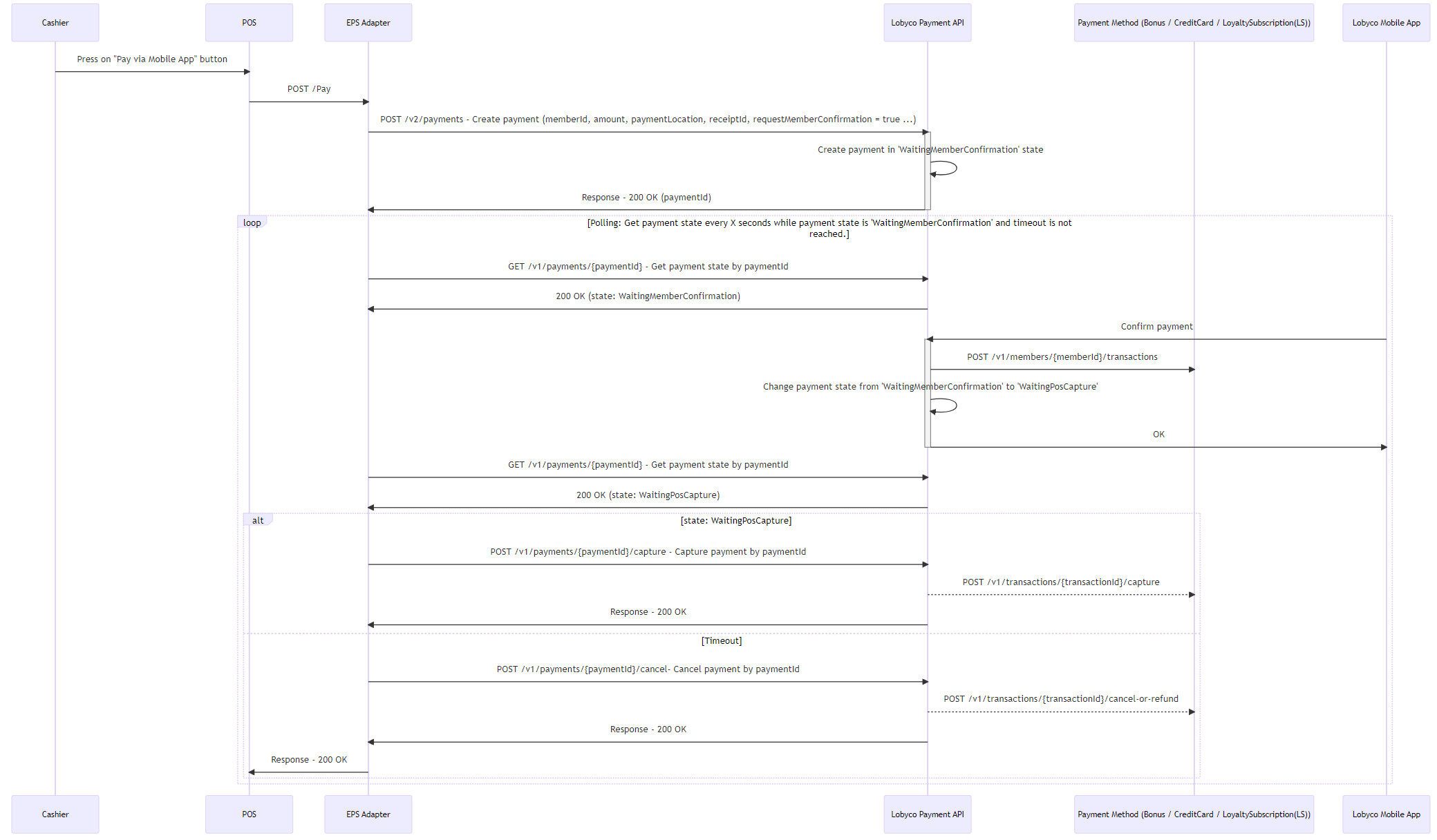
The standard flow: the POS creates the payment, the customer confirms it in the app, the POS captures it.
 ### Payment states
| Payment state | Available actions | Comments |
| ------------------------- | ----------------- | -------------------------------------------------------------- |
| WaitingMemberConfirmation | Confirm, Cancel | |
| WaitingPosCapture | Capture, Cancel | |
| Captured | Refund | Refund creates a separate transaction referencing the original |
| Canceled | | |
## POS payment without customer confirmation
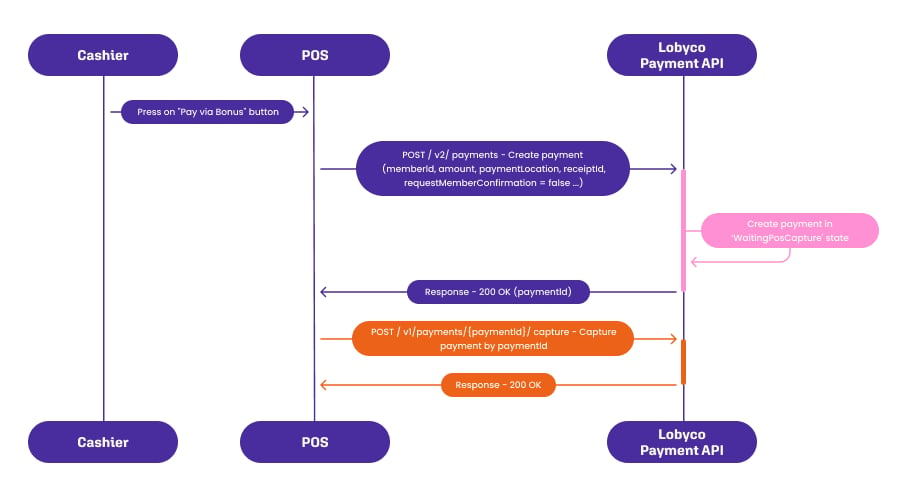
A simpler flow: the POS creates the payment and captures it immediately, with no need to poll the state in between.
Only **bonus** payments may be taken without end-user confirmation. Card and wallet payments always require the customer to confirm.
### Payment states
| Payment state | Available actions | Comments |
| ------------------------- | ----------------- | -------------------------------------------------------------- |
| WaitingMemberConfirmation | Confirm, Cancel | |
| WaitingPosCapture | Capture, Cancel | |
| Captured | Refund | Refund creates a separate transaction referencing the original |
| Canceled | | |
## POS payment without customer confirmation
A simpler flow: the POS creates the payment and captures it immediately, with no need to poll the state in between.
Only **bonus** payments may be taken without end-user confirmation. Card and wallet payments always require the customer to confirm.
 ## Payment Card Provider
Card handling sits behind a generic provider service, so the acquirer can change without changing your integration. Worldline, Rapyd and Moneris are supported today, and new providers can be added.
Supported scenarios:
* Save a card against the customer's account and reuse it for recurring payments
* Pay without storing card details
* Apple Pay and Google Pay
* Loyalty subscription top-ups
* A web interface for card management, where one is needed
Capturing a payment does **not** record the sale. Send the finalized transaction to the Purchase API as well — see [Transaction Data](/integration/pos-point-of-sale-integrations/transaction-data).
## API reference
Endpoint documentation: [Payment Coordinator](/api-reference/payments/payment-coordinator).
## Payment Card Provider
Card handling sits behind a generic provider service, so the acquirer can change without changing your integration. Worldline, Rapyd and Moneris are supported today, and new providers can be added.
Supported scenarios:
* Save a card against the customer's account and reuse it for recurring payments
* Pay without storing card details
* Apple Pay and Google Pay
* Loyalty subscription top-ups
* A web interface for card management, where one is needed
Capturing a payment does **not** record the sale. Send the finalized transaction to the Purchase API as well — see [Transaction Data](/integration/pos-point-of-sale-integrations/transaction-data).
## API reference
Endpoint documentation: [Payment Coordinator](/api-reference/payments/payment-coordinator).