> ## Documentation Index
> Fetch the complete documentation index at: https://help.lobyco.com/llms.txt
> Use this file to discover all available pages before exploring further.
# Discount Integration
> Send the basket to Lobyco and let Lobyco evaluate offers and return calculated discounts.
## API purpose
In a **Discount integration**, Lobyco receives the user basket, evaluates the products, and applies the coupons based on the rules and basket content. Lobyco can return to the POS the coupons to be applied and their definition, or it can return the price calculation and final price as well.
This approach is best when you want Lobyco to own the discount logic rather than replicating offer definitions in the POS.
### The Discount API is not a replacement for the Purchase API
The Discount API only **calculates** discounts for a basket during checkout. It does **not** store the transaction, capture payment, or trigger bonus, digital receipts, or challenges.
After the sale is finalized you must still send it to the **Purchase API** ([POST /v1/purchases](/api-reference/retail-master-data/purchases/post-v1-purchases)) — see [Transaction Data](/integration/pos-point-of-sale-integrations/transaction-data). See [Integration building blocks](/integration/pos-point-of-sale-integrations#integration-building-blocks) for how the two APIs fit together.
### Not sure which approach to choose?
See [Applying discounts: two options](/integration/pos-point-of-sale-integrations#applying-discounts-two-options) for how this compares with the [Direct Coupon Service Integration](/integration/pos-point-of-sale-integrations/direct-coupon-service-integration), where the POS decides which coupons to apply.
## Flow
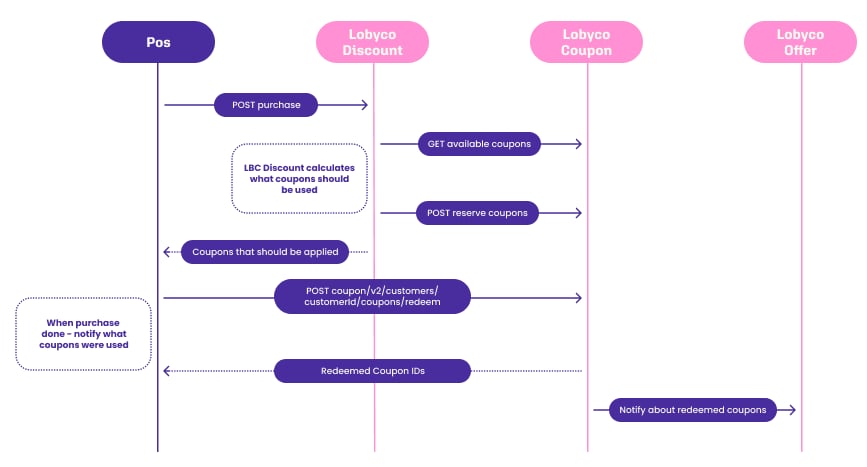
In this integration approach, Lobyco receives the user basket, evaluates the products, and applies the coupons based on the rules and basket content. Lobyco can return to the POS the coupons to be applied and their definition, or it can return also the price calculation and final price.
 ### Send the purchase
Send the purchase to [POST v1/discounted-purchases](/api-reference/promotion-platform/discounts/post-v1-discounted-purchases). Only purchases with a customer should be sent. No discounts are applied to anonymous purchases.
### Confirm coupon redemption
[POST v2/customers/\{customerId}/coupons/redeem](/api-reference/promotion-platform/coupons-pos/post-v2-customers-customerid-coupons-redeem) — POS confirms that the purchase was finished and coupons were used. Coupons can be also redeemed based on coupon ids sent along with transaction data. Include store id and total basket value for better reporting.
### Cancel coupon reservation (optional)
[POST /v1/customers/\{customerId}/coupons/cancel-reservation](/api-reference/promotion-platform/coupons-pos/post-api-v1-customers-customerid-coupons-cancel-reservation) — notify that the purchase was canceled and coupons should be available again on other POSes.
The redeem / cancel-reservation mechanics used in steps 2-3 are shared with the direct Coupon integration and are described in detail in [Coupon Redemption at POS](/integration/pos-point-of-sale-integrations/coupon-redemption-at-pos).
## How to apply the response from `Discount API` Purchase endpoint
**Tip 💡:** Before making any API calls directly to your assigned integration layer, make sure you have created at least one offer in the Lobyco Admin Portal and that you have activated that offer for the customer you are testing your API calls with. We suggest you set up an offer with redemption limit 999. In this way you'll be able to retest with the same offer for a longer time period.
The **Discount API** response will contain several important aspects to analyze:
* Most of the fields from the request will be replicated in the response.
* The **totalAmount** will be decreased by the total discount amount applied to products in the basket.
* Product's **price** will be decreased by the total discount amount applied to that product.
* The response **discounts** collection will be filled in with applied discounts.
```json theme={"system"}
{
...
"discounts": [
{
"name": "Discount_1",
"totalDiscountAmount": 2.0,
"couponIds": [
"Coupon_1", "Coupon_2" // Used coupons in order to apply the discount
],
"appliedProducts": [ // List of products' SequenceNumber for which discount was applied
1
]
}
]
}
```
**Tip 💡:** The **appliedProducts** property will only be populated for product-level discounts. For basket-level discounts, it will be empty.
## How to apply the response from Legacy `Discount API` Basket endpoint
The **Discount API** response will contain several important aspects for POS to analyze:
* It will replicate the **basketId** from the request, for ease of identification.
* It will contain a field called **finalTotal**, containing the total amount of the basket **after** discount application.
```json theme={"system"}
"total": 4000,
"finalTotal": 3967.0
```
**Tip 💡:** Notice that the **discountCalculationAPI** also replicates the basket total before discount application under the **total** field.
* It will contain a list of line items, where the **discountCalculationAPI** will replicate most of the product information (from the request) and will add:
* A **finalTotalSalePrice** containing the line item total sale price **after** discount application.
```json theme={"system"}
{
"finalTotalSalePrice": 198.0,
"id": "71360d70-7880-4433-a639-d066bdcb5b68",
"barcode": "5700123969094",
"quantity": 2,
"sequenceNumber": 1,
"totalSalePrice": 200,
"product": {
"id": "1000000",
"displayName": "Banana",
"categoryId": "1",
"category": "Fruits",
"taxCode": "A",
"salePrice": 100,
"unitOfMeasure": "Piece",
"units": 1
}
```
* A **discounts** field containing the discounts applicable to the respective line item (including the calculated discount amount value after each discount application).
```json theme={"system"}
"discounts": [
{
"id": "4ccec898-1e0e-4a52-affe-44f66416a180",
"description": "Discount_1",
"value": 2.0,
"couponIds": [
"Coupon_2"
],
}
]
```
* A **coupons** field containing all the **used** coupons required to apply the discounts on the current line item.
```json theme={"system"}
"coupons": [
{
"couponId": "Coupon_1",
"barcode": "12345678",
"sequenceNumber": 1,
"campaignId": "4ccec898-1e0e-4a52-affe-44f66416a180"
},
{
"couponId": "Coupon_2",
"barcode": "23456789",
"sequenceNumber": 2,
"campaignId": "0f23c3e9-ecd9-4ca1-87c1-f2b6ef73e4b6"
}
]
```
* Besides line item **discounts** and **coupons**, the response may also contain basket-level **discounts** and **coupons** with a similar structure to those at line item level.
**Tip 💡** The **finalTotal** field described above is calculated by taking into consideration all applied discounts regardless of whether they were applied at line item level or at basket level.
## Compatibility and feature flags
Lobyco treats the Discount API response contract as **stable and backward compatible**. The meaning of existing response fields does not change, and the service does not start returning additional data that would change how an existing integration should interpret the result. While new fields can be introduced, they will be returned as null be default.
Any large new feature that changes calculation behaviour or response content is rolled out **behind a feature flag and is off by default**, so existing integrations are unaffected until you explicitly opt in. Where a flag is available it can be overridden per request via a **query parameter**, so you can validate the new behaviour in a controlled way (for example, against a test customer) before enabling it more broadly.
## Stacking of coupons
The stacking priority of promotions in a basket is determined by the priority set in the Lobyco Promotion Platform Admin. Marketeers can set priorities from 1-10, where priority 1 is the highest. Conflicting offers will be applied according to the priority settings. If two promotions are eligible for a basket—one being product-based and another being basket-based—the application order is determined by the priority order. For promotions with equal priority, the offer with the sooner-expiring coupon takes precedence.
## Offline behaviour
Currently Lobyco Coupon and Discount do not support offline flows. If either POS is offline or Lobyco services are not reachable within a specific time, POS should be able to process the purchase without applying loyalty offers.
One exception to this is coupon redemption itself, which supports an offline path — see [Coupon Redemption at POS](/integration/pos-point-of-sale-integrations/coupon-redemption-at-pos#offline-redemption).
### Send the purchase
Send the purchase to [POST v1/discounted-purchases](/api-reference/promotion-platform/discounts/post-v1-discounted-purchases). Only purchases with a customer should be sent. No discounts are applied to anonymous purchases.
### Confirm coupon redemption
[POST v2/customers/\{customerId}/coupons/redeem](/api-reference/promotion-platform/coupons-pos/post-v2-customers-customerid-coupons-redeem) — POS confirms that the purchase was finished and coupons were used. Coupons can be also redeemed based on coupon ids sent along with transaction data. Include store id and total basket value for better reporting.
### Cancel coupon reservation (optional)
[POST /v1/customers/\{customerId}/coupons/cancel-reservation](/api-reference/promotion-platform/coupons-pos/post-api-v1-customers-customerid-coupons-cancel-reservation) — notify that the purchase was canceled and coupons should be available again on other POSes.
The redeem / cancel-reservation mechanics used in steps 2-3 are shared with the direct Coupon integration and are described in detail in [Coupon Redemption at POS](/integration/pos-point-of-sale-integrations/coupon-redemption-at-pos).
## How to apply the response from `Discount API` Purchase endpoint
**Tip 💡:** Before making any API calls directly to your assigned integration layer, make sure you have created at least one offer in the Lobyco Admin Portal and that you have activated that offer for the customer you are testing your API calls with. We suggest you set up an offer with redemption limit 999. In this way you'll be able to retest with the same offer for a longer time period.
The **Discount API** response will contain several important aspects to analyze:
* Most of the fields from the request will be replicated in the response.
* The **totalAmount** will be decreased by the total discount amount applied to products in the basket.
* Product's **price** will be decreased by the total discount amount applied to that product.
* The response **discounts** collection will be filled in with applied discounts.
```json theme={"system"}
{
...
"discounts": [
{
"name": "Discount_1",
"totalDiscountAmount": 2.0,
"couponIds": [
"Coupon_1", "Coupon_2" // Used coupons in order to apply the discount
],
"appliedProducts": [ // List of products' SequenceNumber for which discount was applied
1
]
}
]
}
```
**Tip 💡:** The **appliedProducts** property will only be populated for product-level discounts. For basket-level discounts, it will be empty.
## How to apply the response from Legacy `Discount API` Basket endpoint
The **Discount API** response will contain several important aspects for POS to analyze:
* It will replicate the **basketId** from the request, for ease of identification.
* It will contain a field called **finalTotal**, containing the total amount of the basket **after** discount application.
```json theme={"system"}
"total": 4000,
"finalTotal": 3967.0
```
**Tip 💡:** Notice that the **discountCalculationAPI** also replicates the basket total before discount application under the **total** field.
* It will contain a list of line items, where the **discountCalculationAPI** will replicate most of the product information (from the request) and will add:
* A **finalTotalSalePrice** containing the line item total sale price **after** discount application.
```json theme={"system"}
{
"finalTotalSalePrice": 198.0,
"id": "71360d70-7880-4433-a639-d066bdcb5b68",
"barcode": "5700123969094",
"quantity": 2,
"sequenceNumber": 1,
"totalSalePrice": 200,
"product": {
"id": "1000000",
"displayName": "Banana",
"categoryId": "1",
"category": "Fruits",
"taxCode": "A",
"salePrice": 100,
"unitOfMeasure": "Piece",
"units": 1
}
```
* A **discounts** field containing the discounts applicable to the respective line item (including the calculated discount amount value after each discount application).
```json theme={"system"}
"discounts": [
{
"id": "4ccec898-1e0e-4a52-affe-44f66416a180",
"description": "Discount_1",
"value": 2.0,
"couponIds": [
"Coupon_2"
],
}
]
```
* A **coupons** field containing all the **used** coupons required to apply the discounts on the current line item.
```json theme={"system"}
"coupons": [
{
"couponId": "Coupon_1",
"barcode": "12345678",
"sequenceNumber": 1,
"campaignId": "4ccec898-1e0e-4a52-affe-44f66416a180"
},
{
"couponId": "Coupon_2",
"barcode": "23456789",
"sequenceNumber": 2,
"campaignId": "0f23c3e9-ecd9-4ca1-87c1-f2b6ef73e4b6"
}
]
```
* Besides line item **discounts** and **coupons**, the response may also contain basket-level **discounts** and **coupons** with a similar structure to those at line item level.
**Tip 💡** The **finalTotal** field described above is calculated by taking into consideration all applied discounts regardless of whether they were applied at line item level or at basket level.
## Compatibility and feature flags
Lobyco treats the Discount API response contract as **stable and backward compatible**. The meaning of existing response fields does not change, and the service does not start returning additional data that would change how an existing integration should interpret the result. While new fields can be introduced, they will be returned as null be default.
Any large new feature that changes calculation behaviour or response content is rolled out **behind a feature flag and is off by default**, so existing integrations are unaffected until you explicitly opt in. Where a flag is available it can be overridden per request via a **query parameter**, so you can validate the new behaviour in a controlled way (for example, against a test customer) before enabling it more broadly.
## Stacking of coupons
The stacking priority of promotions in a basket is determined by the priority set in the Lobyco Promotion Platform Admin. Marketeers can set priorities from 1-10, where priority 1 is the highest. Conflicting offers will be applied according to the priority settings. If two promotions are eligible for a basket—one being product-based and another being basket-based—the application order is determined by the priority order. For promotions with equal priority, the offer with the sooner-expiring coupon takes precedence.
## Offline behaviour
Currently Lobyco Coupon and Discount do not support offline flows. If either POS is offline or Lobyco services are not reachable within a specific time, POS should be able to process the purchase without applying loyalty offers.
One exception to this is coupon redemption itself, which supports an offline path — see [Coupon Redemption at POS](/integration/pos-point-of-sale-integrations/coupon-redemption-at-pos#offline-redemption).