> ## Documentation Index
> Fetch the complete documentation index at: https://help.lobyco.com/llms.txt
> Use this file to discover all available pages before exploring further.
# Loyalty Membership
> Loyalty membership integration.
The customer record is the identity everything else hangs off — purchases, coupons, bonus balances and receipts all reference it. This guide covers what Lobyco stores about a customer, how to keep it in sync with your systems, and what the Admin Tool exposes to your support staff.
## What Lobyco holds about a customer
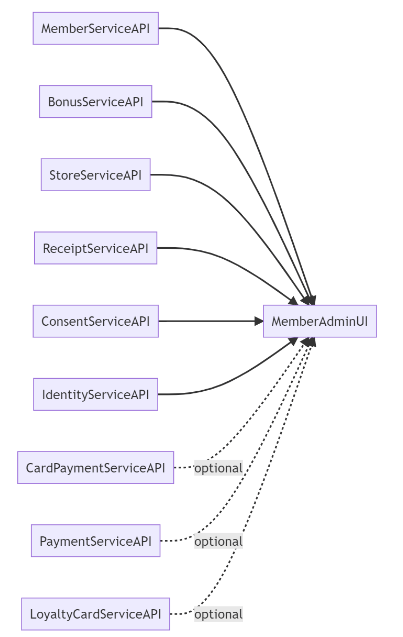
Depending on which services you run, Lobyco maintains and exposes:
| Data | Detail |
| ------------- | ----------------------------------------------------------------- |
| Customer | ID, email, address, loyalty programme |
| Bonus | Money bonus (points) accounts, history, full ledger |
| Store | Favourite store |
| Receipt | Generated from the purchase transaction log |
| Consent | Acceptance of app versions, terms and conditions, data protection |
| Card payments | Payments made with cards registered in the app |
| Loyalty card | One or more virtual cards, used to check in at the POS |
All of it is available to the mobile app, the Admin Tool, and third-party services you expose it to.
 ## Customers
The Customer service covers the full lifecycle: create, retrieve, update, activate, deactivate and delete. Profile data spans personal information (name, birthdate, gender, nationality), contact details, address and custom metadata. Customers can be found by ID, email, phone, personal ID, selected store or loyalty card.
Two rules worth designing around:
* **Deactivating a customer cascades** — their loyalty cards are deactivated too.
* **Deletion is permanent.** Data is removed and the customer is anonymised; there is no undo.
A customer can optionally be flagged as an **employee**, which unlocks an additional bonus percentage if the bonus service is deployed. Customers can also belong to **local cooperatives** that grant type-specific bonuses. Both are visible in the Admin Tool but can only be *changed* through the API — upload a customer identifier and the cooperative name via the Customer service.
### Changes history
Every customer-related change is tracked on the customer's Overview screen with a timestamp and the initials of whoever made it — creation, personal data edits by customer or admin, activation and deactivation, and preferred store changes.
Admins can attach notes explaining a change, or notes about the customer generally. These are typically written off the back of a support interaction.
### Deactivating a customer
Deactivation suspends a customer's access to the app, and can be reversed. A logged-out customer can no longer sign in; a customer who is already signed in sees a notice and is logged out when they dismiss it. The reason given is recorded in the **Changes** section.
## Loyalty cards
A customer can hold one or more cards and uses an active one to check in at the POS, which is what earns benefits and makes coupons redeemable.
| Aspect | Options |
| ---------- | ------------------- |
| Card type | Physical, Virtual |
| Cardholder | Primary, Additional |
| State | Active, Inactive |
Barcodes can be assigned automatically from a pre-loaded queue.
* The **maximum number of active cards per customer is configurable** — imports are rejected once a customer is at the limit.
* Barcode validation enforces configured ranges and prefixes.
* Card creation is **idempotent** via operation IDs, so a retry will not mint a duplicate card.
* Creating a card can optionally replace the customer's existing active cards.
Admins can activate, deactivate and add cards from the Admin Tool, where a customer's physical and virtual cards are listed together.
### Decoding barcodes
The Barcode API turns a raw scanned barcode into structured data using **templates**, which describe how a given barcode is built. A template defines:
* A name, and a type indicating what the barcode represents — an article, a voucher, and so on
* Minimum and maximum length
* Code identifiers, and where they sit within the barcode
* Rules for extracting the data tokens
* Validation rules
Decoding runs in a fixed order:
### Match the barcode to a template
If several templates match, one of them is chosen.
### Validate against that template's rules
### Extract the data
Extraction happens **whether or not validation passed**, so check the validation result rather than assuming a returned payload is valid.
## Employee bonus
Employee bonus percentages are stored with date ranges, so you can ask what percentage applied at a particular moment. Historical entries are kept rather than overwritten.
The feature sits behind a feature flag, and only active customers can carry a bonus.
## Linked customers
Linked customers express relationships between two customer records — an additional cardholder, or another type configured for your environment.
Relationships are **bidirectional**: you can query them from either customer. Removing a customer removes their relationships automatically, and duplicates are rejected.
Both customers must already exist and be active, and the feature must be enabled by flag.
## Importing in bulk
All four areas import the same way: a **synchronous bulk upsert** that creates and updates in one call, validates immediately, and returns per-record success and failure counts.
| Import | Prerequisites |
| ---------------- | ---------------------------------------------------------------------------- |
| Customers | Member ID is the matching key |
| Loyalty cards | Customers must exist first; active-card limit and barcode rules are enforced |
| Employee bonuses | Customers must be active; skipped entries are returned with a reason |
| Linked customers | Both customers must exist and be active; feature flag enabled |
Because validation is immediate and per-record, plan for partial success: validate before sending to keep the failure rate down, use stable identifiers for matching, retry only the failed records, and read the response rather than assuming the batch succeeded.
## Related guides
| Topic | Guide |
| ------------------------------- | -------------------------------------------------------------------------------- |
| Consents and agreements | [Consent](/integration/other-integrations/loyalty-membership/consent) |
| Card payments made in the app | [Payments](/integration/pos-point-of-sale-integrations/payments) |
| Receipts, and loading purchases | [Transaction Data](/integration/pos-point-of-sale-integrations/transaction-data) |
## API reference
Endpoint documentation: [Customers](/api-reference/loyalty-and-membership/members) and [Consent](/api-reference/loyalty-and-membership/consent).
## Customers
The Customer service covers the full lifecycle: create, retrieve, update, activate, deactivate and delete. Profile data spans personal information (name, birthdate, gender, nationality), contact details, address and custom metadata. Customers can be found by ID, email, phone, personal ID, selected store or loyalty card.
Two rules worth designing around:
* **Deactivating a customer cascades** — their loyalty cards are deactivated too.
* **Deletion is permanent.** Data is removed and the customer is anonymised; there is no undo.
A customer can optionally be flagged as an **employee**, which unlocks an additional bonus percentage if the bonus service is deployed. Customers can also belong to **local cooperatives** that grant type-specific bonuses. Both are visible in the Admin Tool but can only be *changed* through the API — upload a customer identifier and the cooperative name via the Customer service.
### Changes history
Every customer-related change is tracked on the customer's Overview screen with a timestamp and the initials of whoever made it — creation, personal data edits by customer or admin, activation and deactivation, and preferred store changes.
Admins can attach notes explaining a change, or notes about the customer generally. These are typically written off the back of a support interaction.
### Deactivating a customer
Deactivation suspends a customer's access to the app, and can be reversed. A logged-out customer can no longer sign in; a customer who is already signed in sees a notice and is logged out when they dismiss it. The reason given is recorded in the **Changes** section.
## Loyalty cards
A customer can hold one or more cards and uses an active one to check in at the POS, which is what earns benefits and makes coupons redeemable.
| Aspect | Options |
| ---------- | ------------------- |
| Card type | Physical, Virtual |
| Cardholder | Primary, Additional |
| State | Active, Inactive |
Barcodes can be assigned automatically from a pre-loaded queue.
* The **maximum number of active cards per customer is configurable** — imports are rejected once a customer is at the limit.
* Barcode validation enforces configured ranges and prefixes.
* Card creation is **idempotent** via operation IDs, so a retry will not mint a duplicate card.
* Creating a card can optionally replace the customer's existing active cards.
Admins can activate, deactivate and add cards from the Admin Tool, where a customer's physical and virtual cards are listed together.
### Decoding barcodes
The Barcode API turns a raw scanned barcode into structured data using **templates**, which describe how a given barcode is built. A template defines:
* A name, and a type indicating what the barcode represents — an article, a voucher, and so on
* Minimum and maximum length
* Code identifiers, and where they sit within the barcode
* Rules for extracting the data tokens
* Validation rules
Decoding runs in a fixed order:
### Match the barcode to a template
If several templates match, one of them is chosen.
### Validate against that template's rules
### Extract the data
Extraction happens **whether or not validation passed**, so check the validation result rather than assuming a returned payload is valid.
## Employee bonus
Employee bonus percentages are stored with date ranges, so you can ask what percentage applied at a particular moment. Historical entries are kept rather than overwritten.
The feature sits behind a feature flag, and only active customers can carry a bonus.
## Linked customers
Linked customers express relationships between two customer records — an additional cardholder, or another type configured for your environment.
Relationships are **bidirectional**: you can query them from either customer. Removing a customer removes their relationships automatically, and duplicates are rejected.
Both customers must already exist and be active, and the feature must be enabled by flag.
## Importing in bulk
All four areas import the same way: a **synchronous bulk upsert** that creates and updates in one call, validates immediately, and returns per-record success and failure counts.
| Import | Prerequisites |
| ---------------- | ---------------------------------------------------------------------------- |
| Customers | Member ID is the matching key |
| Loyalty cards | Customers must exist first; active-card limit and barcode rules are enforced |
| Employee bonuses | Customers must be active; skipped entries are returned with a reason |
| Linked customers | Both customers must exist and be active; feature flag enabled |
Because validation is immediate and per-record, plan for partial success: validate before sending to keep the failure rate down, use stable identifiers for matching, retry only the failed records, and read the response rather than assuming the batch succeeded.
## Related guides
| Topic | Guide |
| ------------------------------- | -------------------------------------------------------------------------------- |
| Consents and agreements | [Consent](/integration/other-integrations/loyalty-membership/consent) |
| Card payments made in the app | [Payments](/integration/pos-point-of-sale-integrations/payments) |
| Receipts, and loading purchases | [Transaction Data](/integration/pos-point-of-sale-integrations/transaction-data) |
## API reference
Endpoint documentation: [Customers](/api-reference/loyalty-and-membership/members) and [Consent](/api-reference/loyalty-and-membership/consent).